Most CRM implementations fail for the same reason: the software gets chosen before the process gets understood. Teams end up with a tool that doesn't fit how they work, adoption stalls, and the system that was supposed to create efficiency creates workarounds instead.
Done right, a CRM implementation transforms how your business manages customer relationships, giving every team member real-time visibility into every interaction, automating the manual work that slows sales teams down, and creating a single source of truth that grows with your business. The difference between the implementations that stick and the ones that don't is structured planning, genuine stakeholder involvement, and choosing software flexible enough to adapt to your reality rather than the other way around.
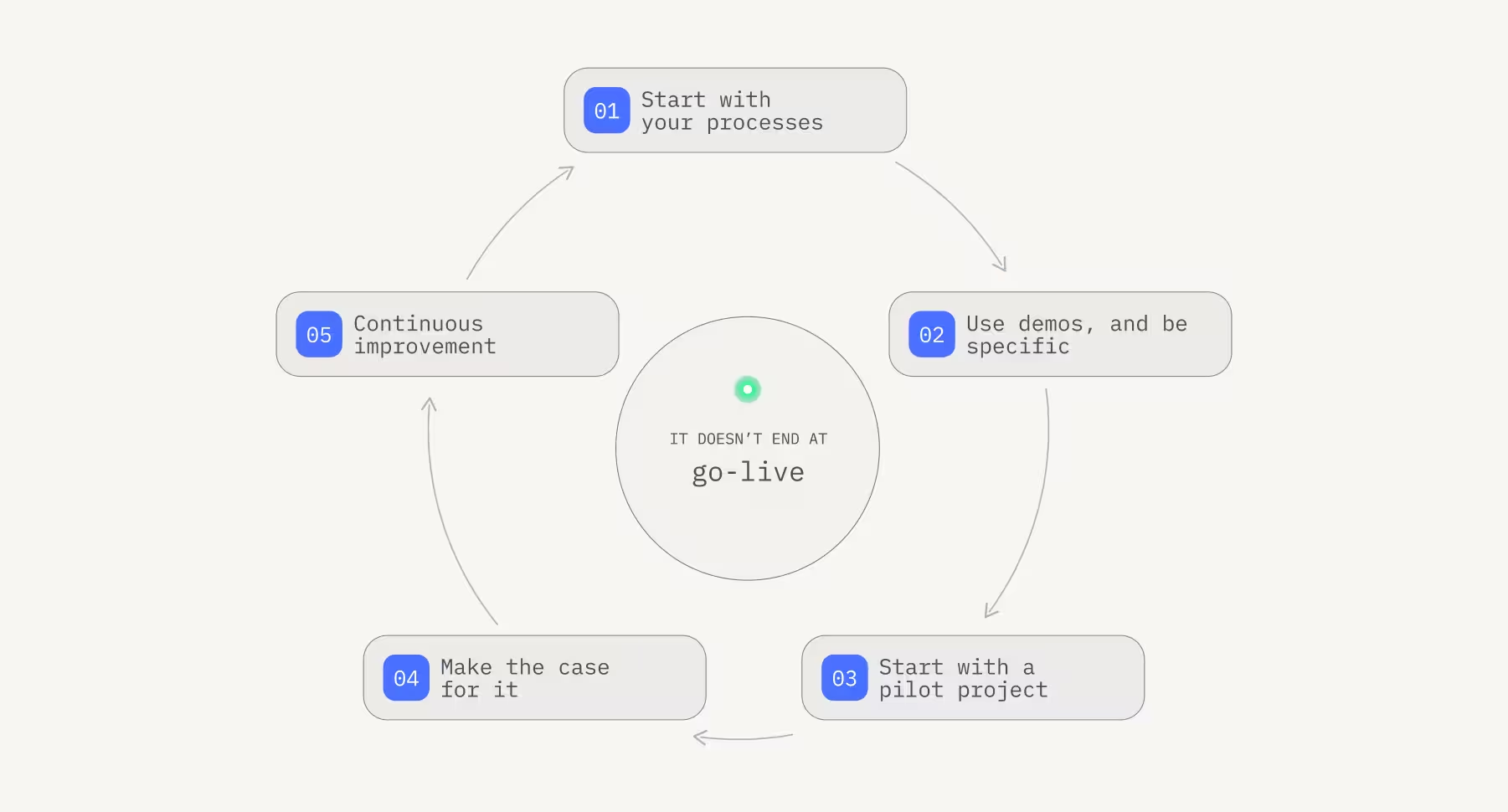
The infographic below breaks that into five phases, starting with your processes and continuing well past go-live.
What CRM actually means
CRM stands for customer relationship management. The term covers three things at once: the software used to manage customer data and interactions, the strategy for documenting and improving relationships with contacts, and the end-to-end process from initial lead to long-term retention.
A well-implemented CRM gives your team a complete, up-to-date view of every customer relationship. At any moment, anyone on the team can see which proposals have been sent, what your sales team discussed with a contact, what support questions they've raised, and where they are in the buying process. That visibility is what drives faster decisions, better customer experiences, and ultimately more closed deals.
The five phases of a CRM implementation
CRM implementation isn't a one-time event, it's a structured process with distinct phases, each building on the last. And it doesn't end at go-live. When your business processes evolve, your CRM needs to evolve with them.
Phase 1: Planning
Every business is different. Before you evaluate a single piece of software, get clear on what your CRM needs to do. The planning phase is where you define the requirements that will drive every decision that follows.
Start with your processes. Which workflows do you need the CRM to support? Do you want data from your website contact form to flow automatically into the system? Do you need invoicing capabilities integrated alongside customer records? Will your team be using it on mobile, in the field, or in locations without reliable internet? Do you have existing tools that need to integrate with whatever you choose?
Think about your customers too. Map the journey your contacts take from first touch to purchase. Where do handoffs happen between departments? Where does information currently get lost? These are the gaps your CRM needs to close.
Access control matters here as well. Before you go any further, define who should be able to see which data. Setting up role structures early prevents a lot of pain later.
Once you have your requirements mapped, build a project plan with four components: a project structure plan that breaks all tasks into work packages with owners and timelines; a project schedule that accounts for dependencies between tasks; a cost plan that captures not just software costs but training time, migration effort, and any implementation fees; and a resource plan that identifies which team members are involved and how their existing workload will be managed during the transition.
One more thing: get your team involved before you finalize anything. Ask the people who will actually use the CRM what they need to work more efficiently. Their input improves the outcome and their buy-in makes adoption dramatically easier.
Phase 2: Selection
Take the time to properly evaluate your options. Many CRM providers offer trial periods or demos, use them, and be specific. Don't just watch a general product tour. Walk through your actual internal processes, ask how many steps it takes to retrieve or update customer information, and verify that role and user rights work the way you need them to.
This is also the phase where you clarify who is making the decision. Identify your decision makers and the people actively supporting the project. Distributed ownership sounds inclusive but often means no one is accountable. Assign clear responsibility.
And consider whether standard CRM software is the right fit. Off-the-shelf tools are built for the average business, they cover common use cases well, but they can't be adapted when your processes don't fit the mold. A low-code platform like Ninox gives you a fully functional CRM out of the box while letting you customize fields, workflows, and automations to match exactly how you work. No compromises, no workarounds.
Phase 3: Implementation
With software selected and a project plan in place, the implementation phase begins. Start with a pilot project, not a full rollout. Select a representative slice of your data and run your core processes through the system with a small group. Surface the issues before they affect your whole team.
If you're using Ninox, changes identified during the pilot are straightforward to make, the visual editor lets you adjust fields, logic, and workflows without developer support. Once the pilot is solid, migrate your full dataset from spreadsheets or your previous system, and work through your project plan to complete the integration with existing tools.
Phase 4: Rollout and adoption
Rolling out to the full team is where implementations often stumble, and almost always for human rather than technical reasons. Employees who've worked a certain way for years react to change with skepticism, sometimes with resistance. This is normal, and the way to manage it is not to mandate adoption but to make the case for it.
Be clear about how the new system benefits each team member specifically. Organize training sessions and maintain a knowledge base where employees can look up answers independently. Create a feedback channel so people can flag problems and suggestions as they arise. Employees who feel heard during a rollout become advocates. Those who feel ignored become the reason adoption stalls.
Phase 5: Evaluation
Once the system is live and in use, the work of continuous improvement begins. Document the problems and challenges that surface during real use. Where is the CRM still creating friction? What workflows still feel manual? What feedback is your team giving?
If you can't resolve issues internally, Ninox's network of implementation partners can help adapt the platform to your processes and integrate it with your wider system landscape. Ongoing optimization isn't a sign that the implementation went wrong, it's how a CRM stays useful as your business grows.
CRM implementation checklist
Use this to stay on track through the process.
Map all existing processes: customer acquisition, account management, and ongoing support, as they work today, not as they're supposed to work.
Analyze your customer journey from the outside in. Where are the friction points? Where does information get lost between departments?
Define your project team: who owns decisions, who owns process design, who owns testing, and who owns IT integration.
Collect requirements from the people who will use the system. Their input is the most valuable data you have at this stage. Set clear goals, timelines, and task ownership before any software is evaluated.
Define your technical requirements: integrations, mobile access, offline capability, API availability.
Run a pilot project with test data before full migration. Validate that your core workflows run the way you need them to.
Build a reference guide and organize training before rollout. Make it easy for employees to help themselves. Establish a structured feedback loop so the system keeps improving after go-live.
The CRM that fits your business exists, you may just need to build it
The businesses that get the most from a CRM are the ones that took the time to understand their processes before choosing their software, involved their teams before they had to, and chose a platform flexible enough to adapt as the business evolved.
Ninox gives you a CRM that's ready to use from day one and configurable to your exact needs from there. Build exactly what your business needs, and adapt it as you grow, not the other way around.
Let's figure it out together.